n8n is a workflow automation and AI agent platform that connects applications through a visual node editor and that, unlike Zapier or Make, you can install on your own servers. Its other difference is economic: it charges for each complete run of a workflow, not for each step, so long processes cost far less than in tools that charge per task.
In short
- What it is: a low-code automation tool with AI nodes for building agents. Its README mentions more than 1,500 integrations and the web catalogue lists 2,587 counting partner and community nodes (n8n catalogue, 2 November 2026).
- How you pay: per execution, meaning each time the full workflow runs, no matter how many steps it has (n8n pricing).
- Price in November 2026: Starter, €20/month (2,500 executions); Pro, €50/month (10,000) or about €121/month (50,000), billed annually. There is no free Cloud plan, only a trial. The self-hosted Community Edition pays no licence fee.
- Real cost of self-hosting: by our estimate, between €1,272 and €4,560 a year including server and maintenance hours. Up to 10,000 executions a month, Cloud is cheaper; between 10,000 and 50,000 it is roughly a tie; above that, or if data cannot leave your infrastructure, self-hosting pays off.
What is n8n and what does it do for a business?
n8n is a process orchestrator: it receives an event (a form, an email, a new row in a sheet, an API call), runs a chain of steps and delivers the result to another system. Each step is a node, and the set of connected nodes is a workflow. The official repository describes it as a "fair-code platform to build and deploy AI agents and workflows", self-hosted or in the cloud (n8n on GitHub).
In a business, n8n covers three families of work:
- Application integration: syncing CRM, ERP, invoicing and support tools without building custom connectors.
- Administrative process automation: customer onboarding, order reconciliation, payment reminders, recurring reports.
- AI agents and AI-powered workflows: classifying emails, summarising documents or answering queries using a language model inside the workflow.
When no native connector exists, the HTTP Request node lets you call any API. That is why n8n's web catalogue already lists 2,587 integrations, counting partner and community nodes (integrations catalogue, checked on 2 November 2026). If you want the big picture before choosing a tool, our workflow automation guide explains how to prioritise processes.
n8n key facts (as of 2 November 2026):
| Fact |
Value |
Source |
| Company and HQ |
n8n GmbH, Berlin (Germany) |
Imprint |
| Founder and year |
Jan Oberhauser; the public repository was created on 22 June 2019 |
GitHub repository (creation date via the GitHub API) |
| Name |
nodemation (node + automation); pronounced "n-eight-n" |
README |
| Funding |
$180M Series C led by Accel (9 Oct 2025), $2.5B valuation |
n8n blog |
| Traction |
6x users and 10x revenue in the year before the Series C; 209,300 GitHub stars |
Blog, GitHub |
| Stable version |
2.45.7 (30 Oct 2026); 3.0 has been out as a pre-release since 27 Oct 2026 (3.0.1 on 28 Oct) |
Releases |
Versions and release cadence change every week: these figures are as of 2 November 2026 and we will review this section when 3.0 goes stable.
How does n8n work? Nodes, triggers and executions
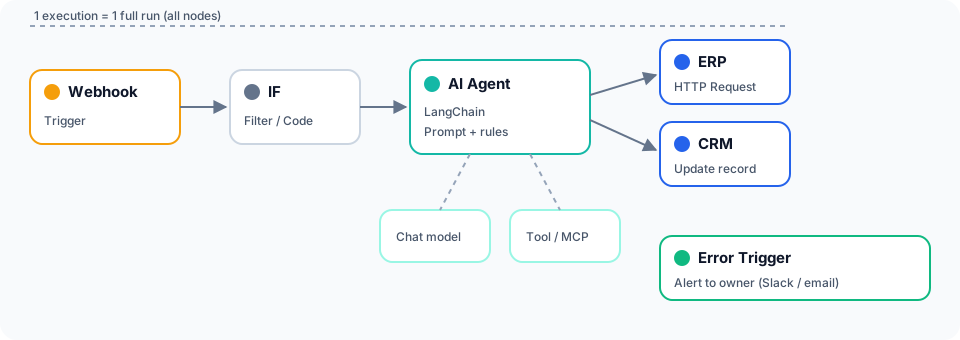
n8n works by chaining nodes: a trigger starts the workflow and the following nodes transform, filter or send the data. Everything is built on a visual canvas, but in any node you can write JavaScript or Python, which sets it apart from purely no-code tools.
There are four concepts worth mastering from day one:
| Concept |
What it means |
Why it matters for a business |
| Node |
Each step in the workflow (an app, a function, an AI model) |
Defines which systems you touch and with which credentials |
| Trigger |
The event that starts the workflow: webhook, schedule, form, a change in an app |
Sets the frequency and therefore the consumption |
| Execution |
One complete pass of the workflow |
It is n8n's billing unit |
| Credential |
Stored access to an external application |
It is the main security control point |
The definition of an execution is the economic key. According to the official pricing page, "an execution is a single run of your entire workflow, no matter how many steps it has" (n8n). A 15-node workflow counts the same as a 2-node one. Zapier, by contrast, counts every successfully completed action as a task, although it does not count triggers or built-in tools such as Formatter or Filter (Zapier pricing). So the longer the process, the more the billing model weighs on the bill.
You do not have to start from scratch: the official template library holds 13,825 workflows published by n8n and its community (checked on 2 November 2026), which you import into the editor in one click. Use them as a starting point, not a finished product: almost none ship with an error workflow or per-workflow credentials, two of the failures covered below.
How much does n8n cost? Cloud and Community Edition pricing
n8n's price depends on whether you use its cloud or host it yourself. The table shows prices in euros with annual billing, which according to the official page saves 17%; put the other way round, paying month by month costs around 20% more. The page does not say whether prices include VAT.
| Plan |
Price |
Executions/month |
Concurrent executions |
AI assistant credits/month |
Who it's for |
| Community Edition |
Free (self-hosted) |
No licence limit |
Depends on your server |
N/A: you bring your own AI key |
Technical teams, testing, internal use |
| Starter (Cloud) |
€20/month |
2,500 |
5 |
1,600 |
A department's first workflows |
| Pro 10,000 (Cloud) |
€50/month |
10,000 |
20 |
4,000 |
Several areas with workflows in production |
| Pro 50,000 (Cloud) |
≈€121/month (€1,450/year) |
50,000 |
50 |
9,600 |
Mid volume without a sysadmin team |
| Business (self-hosted only) |
€667/month |
40,000 |
Not published |
N/A |
Companies that need SSO, Git and environments |
| Enterprise |
Custom |
Custom |
200+ |
On request |
Large accounts, SLA and dedicated support |
Source: n8n.io/pricing, checked on 2 November 2026.
Four fine-print details worth knowing:
- If you exceed your quota, workflows keep running. Starter and Pro carry no overage fees: the "Overage fees" row marks them as "Capped". On Business, every additional 300,000 executions cost €4,000, and on Enterprise overage is set in the contract. On annual Business, n8n reaches out when you hit 80% of your yearly quota.
- Business is self-hosted only: the Cloud version of Business is, for now, on a waitlist.
- Startup discount: companies with fewer than 20 employees may qualify for 50% off Business.
- Trials, not a free plan: n8n Cloud has no permanent free plan. There is a single free trial, no card required, with Pro features and its own limits: 1,000 executions, 5 concurrent, 180 seconds per execution and 800 assistant credits. Business has its own 14-day trial, which requires a card.
What is n8n self-hosted and what do you need to run it?
n8n self-hosted means installing the software on your own infrastructure (your own server, a private cloud or a provider such as AWS, Azure or Google Cloud) instead of using n8n Cloud. Without a licence key, n8n starts as the free Community Edition; if you add a Business or Enterprise key, those editions are activated (n8n documentation).
The free edition is complete for building workflows, but it lacks features a mid-sized company usually needs (edition comparison):
- SSO (SAML and LDAP) and sharing of workflows and credentials.
- Projects, environments and version control with Git.
- External secrets, log streaming and multi-main mode.
If you register the installation with an email address, you get a free key that unlocks folders and debugging features. By default n8n stores credentials, executions and workflows in SQLite and it also supports PostgreSQL (supported databases). To scale with queue mode you need PostgreSQL and Redis, because the documentation itself advises against using that mode with SQLite (queue mode in n8n).
The official Cloud vs self-hosted comparison sums it up: self-hosting requires "technical knowledge for setup and configuration", while Cloud requires none (n8n Docs).
Where does n8n Cloud host your data?
n8n Cloud hosts the platform's hardware and data in the European Union, on Microsoft Azure. According to its security page, data is "currently hosted in the European Union", storage is encrypted with AES-256 and the security programme is aligned with SOC 2, with annual audits by an independent auditor (n8n security). Having the data in the EU simplifies the GDPR analysis, although you still need to review the data processing agreement with n8n. Self-hosting is only essential if data cannot leave your network or if n8n has to reach internal systems that are not exposed to the internet.
What does self-hosted n8n really cost?
The Community Edition pays no licence fee, but it is not free. You have to add the server, the database, backups and, above all, the hours of someone who updates and monitors it. In October 2026 alone, n8n published 48 versions, with at least one every working day (releases on GitHub), so maintenance is not optional.
| Scenario |
Infrastructure/month |
Maintenance/month |
Approximate annual cost |
| Cloud Starter (2,500 executions) |
Included |
0 h |
€240 |
| Cloud Pro (10,000 executions) |
Included |
0 h |
€600 |
| Cloud Pro (50,000 executions) |
Included |
0 h |
€1,450 |
| Community, one server (2 vCPU, 4 GB) |
€6-25 |
2-4 h (€100-200) |
€1,272-2,700 |
| Community with queue mode (PostgreSQL, Redis, workers) |
€40-80 |
4-6 h (€200-300) |
€2,880-4,560 |
| Business self-hosted (40,000 executions) |
€40-80 + €667 licence |
4-6 h (€200-300) |
€10,884-12,564 |
Technova estimate based on these assumptions: hours cover the platform only (updates, backups, database and server); the hours spent operating workflows (reviewing errors, renewing credentials) are the same on Cloud and self-hosted, so they are not added. Prices excluding VAT, technician time at €50 per hour, servers in the EU (Hetzner Cloud starts at €5.99/month excluding VAT according to its website) and licence prices from n8n.io/pricing as of 2 November 2026.
Why 2 to 6 hours a month? The minimum covers one tested update per month, checking backups and reviewing failed executions. The maximum applies with several workers or when a major version breaks compatibility, as happened with 2.0. With 3.0 already in pre-release, it is worth budgeting the upper end during the first year.
The conclusion is counter-intuitive and depends on volume:
- Up to 10,000 executions a month, Cloud is clearly cheaper: €240-600 a year versus a minimum of €1,272 self-hosted.
- Between 10,000 and 50,000, they even out. For example, with 25,000 executions a month you need Pro 50,000 (€1,450 a year, no maintenance), while a well-maintained server of your own costs between €1,272 and €2,700.
- Above 50,000, self-hosting wins: a queue-mode cluster (€2,880-4,560 a year) handles hundreds of thousands of executions with no volume charge. On Cloud, beyond that point only custom Enterprise remains, because Business Cloud is on a waitlist.
One caveat changes the comparison: the Community cluster has no SSO, Git version control or environments. If your security policy requires SSO, the real comparison is not Community but Business self-hosted, between €10,884 and €12,564 a year according to the table.
Price aside, self-hosting pays off when data cannot leave your infrastructure or when you need to connect to internal systems without exposing them to the internet.
How do you install n8n? Docker in two commands
The fastest way to try n8n on your machine is Docker. The official Docker installation guide starts from these two commands:
docker volume create n8n_data
docker run -it --rm --name n8n -p 5678:5678 -v n8n_data:/home/node/.n8n n8nio/n8n
Then open http://localhost:5678 and create the owner account. The n8n_data volume keeps workflows and credentials even if you delete the container. If you just want a quick look and have Node.js (between versions 20.19 and 24.x), npx n8n is enough (npm installation).
For production, that is not enough. The documentation proposes Docker Compose with a Traefik proxy that handles HTTPS. For production we recommend adding PostgreSQL instead of SQLite, daily backups of the database and of the encryption key (N8N_ENCRYPTION_KEY), and a pinned image version so updates are controlled. Without that key, stored credentials cannot be recovered.
How do you build your first n8n workflow? 5 steps in 10 minutes
A good first workflow receives a web form, classifies the message with AI and sends it to the CRM. With n8n installed (or with the Cloud trial), follow these steps:
- Trigger: create a workflow and add the Webhook node with the POST method. n8n gives you two URLs: a test one and a production one.
- AI: add an OpenAI, Anthropic or Gemini node with your credential and a prompt such as "Classify this message as sales, support or other and return only the label".
- Routing: add a Switch node that sends each label to its own branch.
- Destination: on the sales branch, your CRM node (HubSpot, Pipedrive or Salesforce) with the create-or-update contact action; on the support branch, a Slack or email alert.
- Test and publish: click "Execute workflow", send a test request to the test URL (for example with
curl -X POST) and check each node's output. When everything adds up, click "Publish" to activate the production URL.
This five-node workflow uses a single execution per message. Before calling it done, add an error workflow with an Error Trigger so that a failure alerts a person.
Is n8n open source? The Sustainable Use License
n8n is not open source in the strict sense: it is fair-code. The code is public and you can modify it, but the Sustainable Use License only allows you to use it "for your own internal business purposes" or for personal or non-commercial use, and you may only distribute it to third parties free of charge and for non-commercial purposes (licence on GitHub). Files marked .ee additionally require an Enterprise licence.
The practical rule comes from the licence FAQ itself: if workflows are only created or modified by people in your organisation, you can use the Community Edition for free. Applied to real cases:
| Case |
Allowed on the Community Edition? |
| Automating your internal processes (invoices, leads, reports) |
Yes |
| Using n8n "behind the scenes" in your product: your users trigger workflows you built, but never see or configure n8n |
Yes |
| A consultancy charging to design, set up and maintain workflows or to train the team |
Yes |
| Building workflows for a client on your instance, without the client being able to create or edit them |
Yes |
| Hosting n8n so your clients can build their own workflows, even through your own interface |
No: requires an Enterprise licence |
| Selling a product whose value is mainly the automation capability n8n provides |
No |
| Forking n8n to launch your own tool or removing the branding (white label) |
No |
The FAQ sums up the test this way: what matters is not whether users see the n8n interface, but who controls the workflow logic and whose commercial interests it serves. If your case fits none of the examples, n8n asks you to write to license@n8n.io; if it is a product you sell, also check with your legal adviser.
n8n vs Zapier vs Make: key differences in one table
n8n, Zapier and Make solve the same problem with different philosophies: Zapier prioritises ease of use for business users, Make a very detailed visual canvas and n8n technical control and cost at volume. We have analysed it in depth in our Zapier vs n8n comparison; here is the short version with data verified on 2 November 2026:
| Criterion |
n8n |
Zapier |
Make |
| Billing unit |
Execution (full workflow) |
Task (each successfully completed action) |
Credit (each module action) |
| Entry paid plan (annual billing) |
Starter: €20/month, 2,500 executions |
Professional: $19.99/month, 750 tasks |
Free plan with 1,000 credits/month; paid plans scale by credit volume and top up in packs of 1,000 or 10,000 (make.com/pricing) |
| Self-hosting |
Yes, Community Edition with no licence fee |
No |
No |
| What does not count towards usage |
Nothing: each execution counts once |
Triggers, polling, failed actions and built-in tools (Formatter, Filter) |
The Router and error handlers (Rollback, Break, Resume, Commit, Ignore) |
Mind the currencies: n8n bills in euros and Zapier publishes its prices in dollars, charged at the exchange rate at the time of payment. Zapier also applies a 33% discount for annual billing, so on monthly billing its entry plan is more expensive. Make says most actions consume 1 credit and some AI features consume more (Make pricing FAQ).
A worked example: a workflow with one trigger and 4 actions that runs 2,000 times a month uses 2,000 executions in n8n, which fit in the Starter plan. In Zapier, the same workflow generates 8,000 tasks, because each of the 4 actions counts (if one were a Formatter or Filter step, it would not). In Make, about 8,000 credits for the same reason. Source for the counting rules: the official pricing pages of n8n, Zapier and Make.
What to add up before deciding to migrate from Zapier or Make. Comparing your current bill with n8n's price is not enough. An honest calculation adds four items: the n8n licence or plan, the infrastructure if you self-host, the platform hours from the real-cost table and the hours to rebuild each workflow, which you pay once because every Zap or scenario has to be rebuilt with n8n nodes and tested again. If the annual saving does not cover that migration cost in the first year, stay where you are and migrate only the longest, highest-volume workflows.
For the rest of the market (Power Automate and others), see the 9 best workflow automation platforms.
Can n8n build AI agents?
Yes. n8n includes an AI Agent node built on LangChain that, according to the documentation, lets you connect "a chat model and one or more tools" so that the agent decides which tool to use for each task (AI Agent node). The pieces that matter to a business:
- Interchangeable models: there are nodes for OpenAI (the ChatGPT models), Anthropic, Google Gemini and Ollama. Ollama lets you use local models without data leaving your server.
- MCP in both directions: the MCP Client Tool node lets the agent use external MCP servers, and the MCP Server Trigger turns a workflow into an MCP server that Claude or other assistants can call.
- Building workflows in natural language: the AI Workflow Builder creates and fixes workflows from a description and consumes the plan's AI credits.
The other relevant change is n8n 2.0, stable since 15 December 2025, whose motto is "secure by default". Code node code runs in isolation, access to environment variables is blocked, nodes that run system commands are disabled by default, and saving a workflow no longer changes the production version until you click "Publish" (n8n blog). If the concept of an agent is new to your team, start with our enterprise AI agents guide.
What do businesses use n8n for? 5 use cases
The best n8n use cases combine high volume, several systems and data that must not leave the company. These are five common patterns in SMEs and mid-sized companies:
- Invoicing and collections: reading incoming invoices, extracting data with AI, validating it against the ERP and flagging outstanding payments. If you also issue e-invoices, we cover it in our e-invoicing service.
- Lead management: collecting web forms, enriching the contact, scoring it and creating it in the CRM with its assigned sales rep.
- First-line support: classifying incoming tickets with a language model and routing them to the right queue with a draft reply.
- Management reports: every Monday, consolidating sales, marketing and operations data into a single summary.
- Internal AI agents: an agent that queries the CRM or internal documentation and answers within rules you define. If you need someone to build it and take it to production, that is what we do in AI agents for business.
Worked example (illustrative): a company receives 1,200 invoices a month. The workflow has one trigger and 6 actions: read the attachment, extract the data with AI, validate it in the ERP, record it, archive the PDF and alert if there are discrepancies. In n8n that is 1,200 executions a month, which fit in Starter (2,500). In Zapier it would be up to 7,200 tasks, above the entry Professional plan (750). The difference in billing model shows as soon as the process has more than two or three steps.
In large enterprises, the case studies published by n8n include Vodafone, which saved £2.2 million in threat intelligence; Trendyol, with 700 active workflows in under a year; and Stepstone, which started with one team on the Community Edition and reached a 3,000-employee rollout, with more than 700 workflows in production and 2 to 3 million documents parsed a month. Its path shows when paying starts to make sense: you start self-hosted in a technical team, and the licence arrives when SSO, permissions and environments are needed company-wide. For cases involving sensitive personal data, self-hosting makes GDPR compliance easier because you decide where the data lives; we cover it in detail in AI agents and GDPR.
What are the most common mistakes in n8n installations?
The most common mistakes in n8n installations have nothing to do with the tool and everything to do with how it was set up. n8n 2.0's secure-by-default changes do not prevent them, because they depend on whoever runs the instance:
- Shared credentials: a single service account with admin rights for every workflow. If it leaks, everything leaks.
- No error workflow: no workflow uses an Error Trigger to alert a person. Failures are discovered weeks later.
- SQLite in production at volume: the database grows with the execution history and nobody set up pruning or the migration to PostgreSQL.
- Versions left un-updated for months, while n8n published 48 versions in October 2026 alone.
- Webhooks without authentication, reachable by anyone who knows the URL.
- Workflows without an owner: nobody knows who created a workflow or which business process depends on it.
None is hard to fix, but all are cheaper to avoid in the initial design than to repair after an incident.
When should you choose n8n (and when not)?
n8n is the best option when you have long or high-volume processes, someone technical on the team and a need to control where data lives. It is not the best option if nobody in the company will maintain it or if your automations are few, short and low-volume. This matrix sums up the decision:
| Factor |
Your situation |
Recommendation |
| Volume |
Fewer than 10,000 executions a month |
n8n Cloud (Starter or Pro), or Zapier/Make if workflows have 2-3 steps |
| Volume |
More than 50,000 executions a month or many-step workflows |
Self-hosted n8n in queue mode |
| Team |
100% business users, no IT support |
Zapier, Make or n8n Cloud; never self-hosted n8n |
| Team |
Someone technical can spend 2-6 h a month on it |
Self-hosted n8n |
| Data |
Sensitive data or internal systems not reachable from the internet |
Self-hosted n8n, with local models via Ollama if needed |
| Connectors |
You need a very specific connector that only exists on another platform |
That other platform, or n8n with the HTTP Request node if the app has an API |
n8n limitations to know before you choose it
n8n's drawbacks are not about price but about what it demands from the team:
- A real learning curve. Each node receives and returns a list of items and runs once per item (n8n data structure). Understanding that and writing expressions such as
{{ $json.email }} is what separates a workflow that works from one that duplicates records. A business user takes longer to master it than Zapier.
- Large files. By default n8n keeps binary data (PDFs, images) in memory, and the documentation warns this can crash the instance with large files. You have to switch to
filesystem mode, or database if you use queue mode (handling binary data).
- Limited concurrency on Cloud. Starter allows 5 simultaneous executions and Pro 20 or 50 depending on the tier. A webhook spike (a campaign, month-end close) queues up.
- Frequent changes. Two major versions in under a year (2.0 stable in December 2025 and 3.0 in pre-release since October 2026) mean reviewing workflows and Code nodes before upgrading.
- Templates and community nodes of uneven quality. They are a good shortcut, but check which permissions they request and who maintains them before using them in production.
None of these limitations rules n8n out, but they all point the same way: without a technical person who understands it, the per-execution saving gets lost in debugging hours.
How do you get started with n8n in your company? A 4-step plan
Getting started with n8n properly takes weeks, not months, if you follow a clear order:
- Process inventory (week 1): list the repetitive tasks, their monthly volume and the systems they touch. Prioritise by hours saved and risk of error. Our business process automation guide includes a prioritisation template.
- Cloud or self-hosted decision (week 1): use the real-cost table and the matrix above. Start on Cloud if you have no systems team; move to self-hosted when volume, data policy or the need for SSO justifies it.
- Pilot with one process (weeks 2-4): a single workflow in production, with an error workflow, alerts and a named owner.
- Training and governance (month 2): define who can create workflows, how credentials are stored and how workflows are documented. Training the team is what stops n8n from becoming a drawer full of orphaned workflows.
At Technova we design and implement AI automation workflows and train in-house teams in building AI agents. In Spain, that training can be subsidised through FUNDAE: we explain how on our FUNDAE subsidised training page. If you want to know which of your company's processes to automate first with n8n, talk to our automation team or explore our AI training programmes.
About the author: Alfons Marques is a digital transformation consultant and the founder of Technova Partners, where he designs AI automation projects and trains in-house teams to build and maintain their own workflows and agents. Connect on LinkedIn
Frequently asked questions about n8n
How do you pronounce n8n and what does it mean?
It is pronounced "n-eight-n". It is short for nodemation: node because it uses a node-based view and Node.js, and mation for automation. Its founder, Jan Oberhauser, shortened it because the full name was too long to type on the command line.
Who created n8n and where is it from?
n8n was created by Jan Oberhauser in 2019 and is developed by n8n GmbH, headquartered in Berlin (Germany). In October 2025 it closed a $180 million Series C led by Accel, with NVentures (NVIDIA's venture arm) among the investors, at a $2.5 billion valuation.
Is n8n free?
Yes, the self-hosted Community Edition is free for internal use under the Sustainable Use License, although you pay for the server and maintenance. The Cloud version is paid, from €20/month on Starter with 2,500 monthly executions and annual billing, according to the official pricing page checked on 2 November 2026.
Does n8n Cloud have a free plan?
No. n8n Cloud has no permanent free plan, only a one-off trial with no card required, Pro features and limits of 1,000 executions, 5 concurrent and 180 seconds per execution. The free option is the Community Edition, which you install on your own server and which has no licence limit on executions.
Do I need to know how to code to use n8n?
Not for simple workflows: the visual editor lets you connect apps and configure nodes without code. It does help to have someone technical for expressions, API calls with the HTTP Request node and Code nodes in JavaScript or Python, and it is essential if you self-host.
How much does it cost to host n8n on a server?
From about €6/month for a small server in the EU, plus backups and 2 to 6 hours of maintenance a month. By our estimate, the total cost ranges from €1,272 to €4,560 a year, compared with €240-1,450 a year for the Cloud Starter and Pro plans.
What is the difference between n8n Cloud and n8n self-hosted?
With n8n Cloud, the company n8n manages the infrastructure and data is hosted in the European Union. With n8n self-hosted, you manage it: you decide where data lives and pay no licence fee on the Community Edition, but you take on the infrastructure, security and maintenance.
Is n8n secure?
Yes, if it is configured properly. n8n Cloud aligns its security programme with SOC 2 and undergoes annual independent audits, hosts data in the EU and encrypts storage with AES-256. Since version 2.0, user code runs in isolation by default. When self-hosting, security is up to you: HTTPS, per-workflow credentials, authenticated webhooks and frequent updates.
Is n8n GDPR compliant for sensitive data?
It can be, but GDPR compliance belongs to your company, not to the tool. On Cloud, data resides in the EU and you need to review the data processing agreement with n8n. When self-hosting you decide where data is stored and, with local models through Ollama, data does not go out to an AI provider either.
n8n or custom Python code?
n8n pays off when the workflow connects several applications with well-known APIs and has to be maintained by someone who is not a full-time developer. A Python script or service is better for complex logic, heavy data processing or when you need automated tests and strict version control. They can also be combined: n8n orchestrates the process and calls your code through the HTTP Request node or the Code node.
Does n8n work with ChatGPT?
Yes. n8n has OpenAI nodes that use the same models as ChatGPT with your API key, both for one-off tasks (summarising, classifying, extracting data) and inside the AI Agent node. It also supports Anthropic, Google Gemini and local models through Ollama, so you are not tied to a single provider.
Which companies use n8n?
The case studies published by n8n include Vodafone, which saved £2.2 million in threat intelligence; Trendyol, with 700 active workflows in under a year; and Stepstone, which went from four early adopters to a 3,000-employee rollout.
What are the alternatives to n8n?
The main ones are Zapier and Make, both cloud-only and billed per task or per credit, and Microsoft Power Automate if you already work with Microsoft 365. If you want another self-hostable option, Activepieces (MIT licence in its community edition) and Node-RED (Apache 2.0) are open source. We compare them in our guide to the best workflow automation platforms.
Is n8n better than Make?
It depends on volume and team. Make charges one credit per module action, just as Zapier charges per task, whereas n8n charges for the complete execution and can be self-hosted. Make is more visual for business users. n8n pays off for long workflows, AI workflows or data that must stay in-house.
Is n8n better than Zapier?
It depends on the team's profile and the volume. Zapier is simpler for business users; n8n is more cost-effective for long workflows because it charges per complete execution rather than per step, and it also allows self-hosting. The full comparison is in our Zapier vs n8n article.